


In this article, I want to cover the overall design of coding agents and agent harnesses: what they are, how they work, and how the different pieces fit together in practice. Readers of my Build a Large Language Model (From Scratch) and Build a Large Reasoning Model (From Scratch) books often ask about agents, so I thought it would be useful to write a reference I can point to.
More generally, agents have become an important topic because much of the recent progress in practical LLM systems is not just about better models, but about how we use them. In many real-world applications, the surrounding system, such as tool use, context management, and memory, plays as much of a role as the model itself. This also helps explain why systems like Claude Code or Codex can feel significantly more capable than the same models used in a plain chat interface.
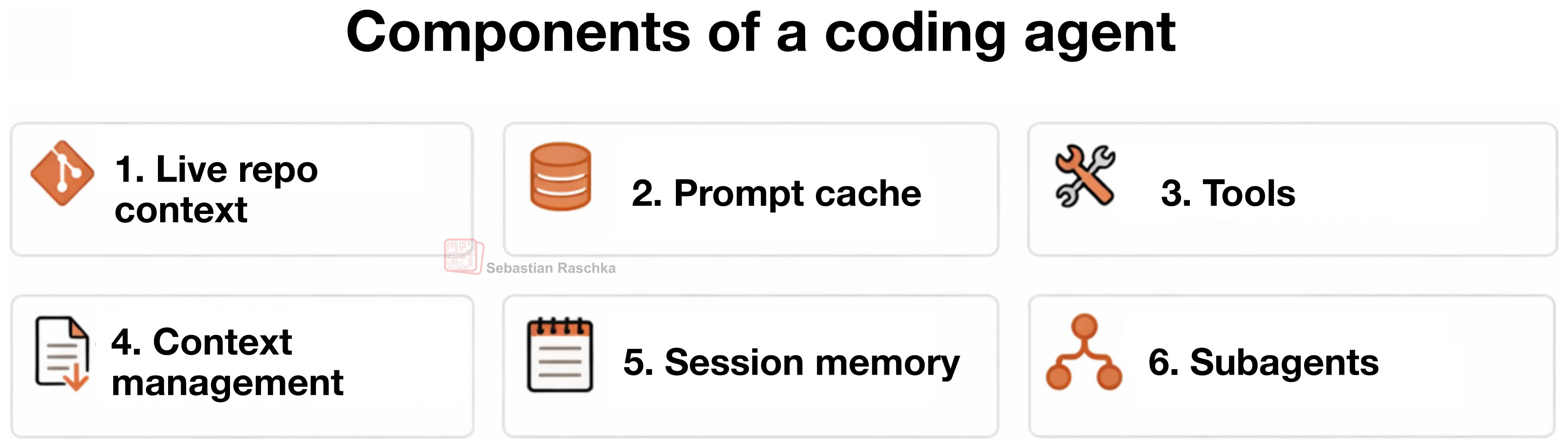
In this article, I lay out six of the main building blocks of a coding agent.
Claude Code, Codex CLI, and Other Coding Agents
You are probably familiar with Claude Code or the Codex CLI, but just to set the stage, they are essentially agentic coding tools that wrap an LLM in an application layer, a so-called agentic harness, to be more convenient and better-performing for coding tasks.
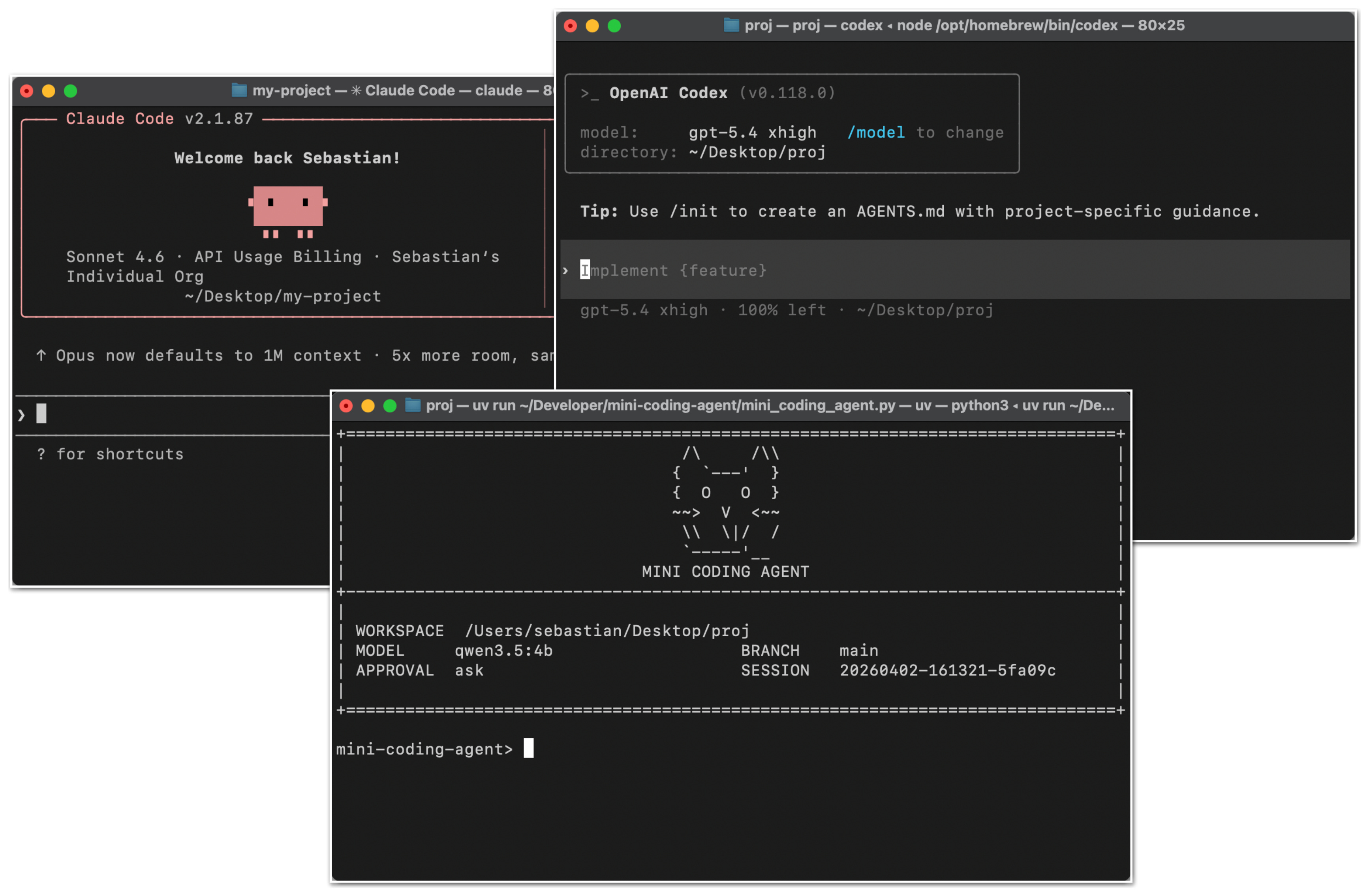
Coding agents are engineered for software work where the notable parts are not only the model choice but the surrounding system, including repo context, tool design, prompt-cache stability, memory, and long-session continuity.
That distinction matters because when we talk about the coding capabilities of LLMs, people often collapse the model, the reasoning behavior, and the agent product into one thing. But before getting into the coding agent specifics, let me briefly provide a bit more context on the difference between the broader concepts, the LLMs, reasoning models, and agents.
On The Relationship Between LLMs, Reasoning Models, and Agents
An LLM is the core next-token model. A reasoning model is still an LLM, but usually one that was trained and/or prompted to spend more inference-time compute on intermediate reasoning, verification, or search over candidate answers.
An agent is a layer on top, which can be understood as a control loop around the model. Typically, given a goal, the agent layer (or harness) decides what to inspect next, which tools to call, how to update its state, and when to stop, etc.
Roughly, we can think about the relationship as this: the LLM is the engine, a reasoning model is a beefed-up engine (more powerful, but more expensive to use), and an agent harness helps us the model. The analogy is not perfect, because we can also use conventional and reasoning LLMs as standalone models (in a chat UI or Python session), but I hope it conveys the main point.
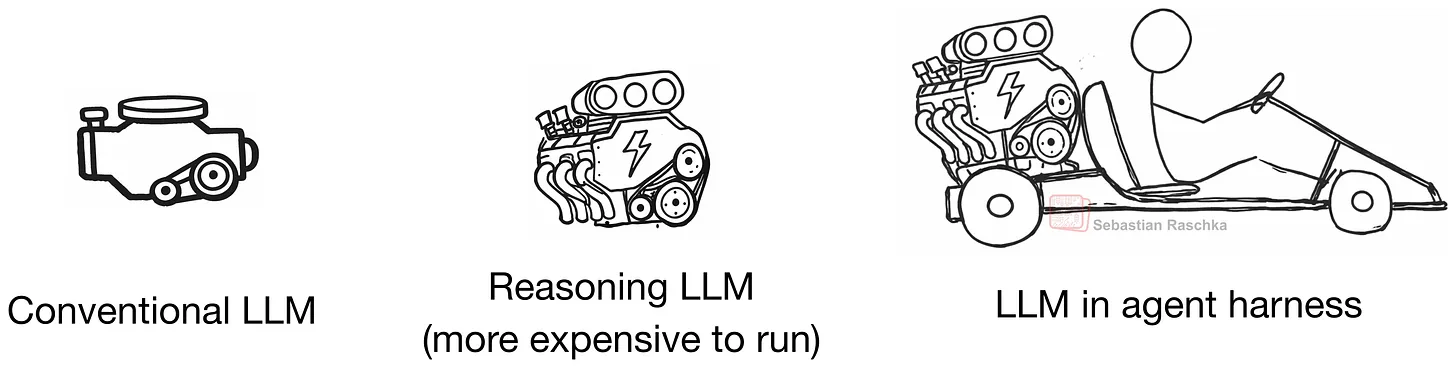
In other words, the agent is the system that repeatedly calls the model inside an environment.
So, in short, we can summarize it like this:
LLM: the raw model
Reasoning model: an LLM optimized to output intermediate reasoning traces and to verify itself more
Agent: a loop that uses a model plus tools, memory, and environment feedback
Agent harness: the software scaffold around an agent that manages context, tool use, prompts, state, and control flow
Coding harness: a special case of an agent harness; i.e., a task-specific harness for software engineering that manages code context, tools, execution, and iterative feedback
As listed above, in the context of agents and coding tools, we also have the two popular terms agent harness and (agentic) coding harness. A coding harness is the software scaffold around a model that helps it write and edit code effectively. And an agent harness is a bit broader and not specific to coding (e.g., think of OpenClaw). Codex and Claude Code can be considered coding harnesses.
Anyways, A better LLM provides a better foundation for a reasoning model (which involves additional training), and a harness gets more out of this reasoning model.
Sure, LLMs and reasoning models are also capable of solving coding tasks by themselves (without a harness), but coding work is only partly about next-token generation. A lot of it is about repo navigation, search, function lookup, diff application, test execution, error inspection, and keeping all the relevant information in context. (Coders may know that this is hard mental work, which is why we don’t like to be disrupted during coding sessions :)).
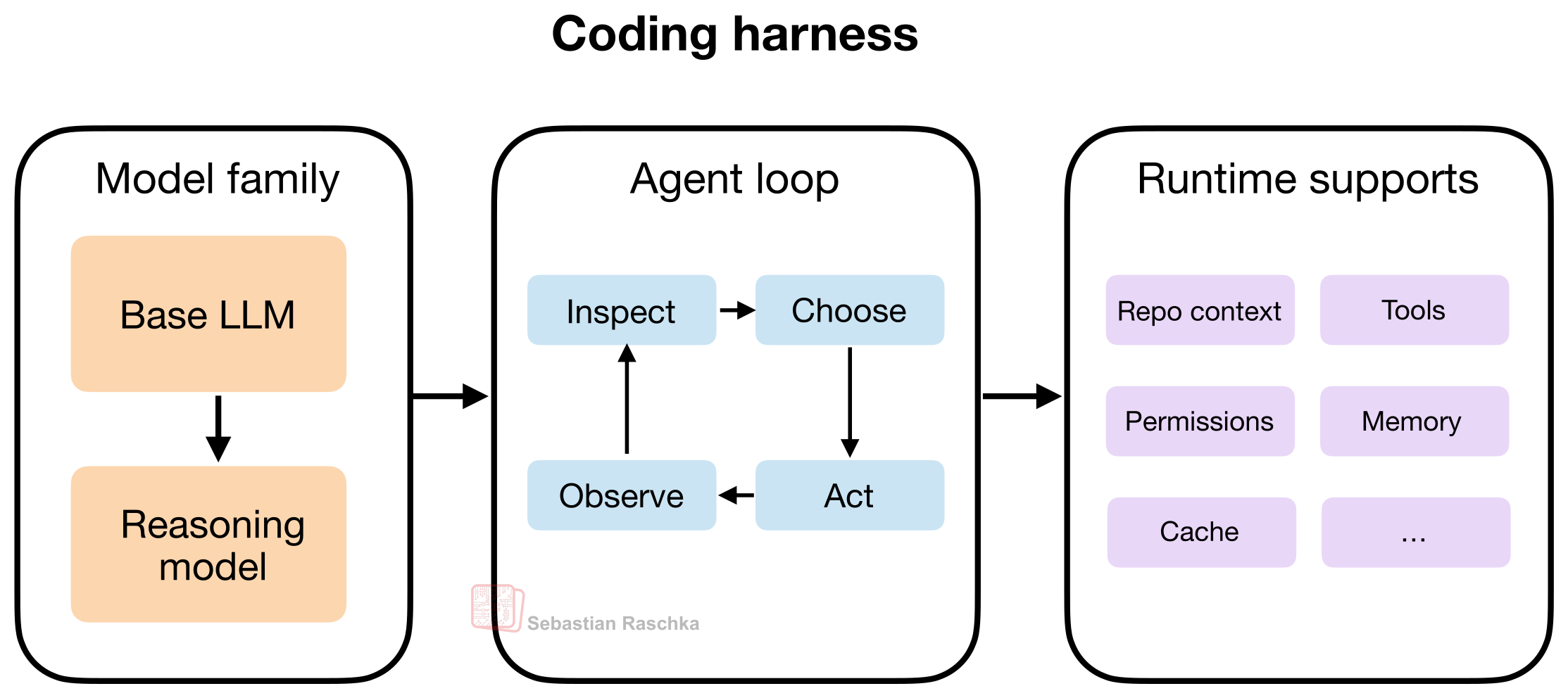
The takeaway here is that a good coding harness can make a reasoning and a non-reasoning model feel much stronger than it does in a plain chat box, because it helps with context management and more.
The Coding Harness
As mentioned in the previous section, when we say harness, we typically mean the software layer around the model that assembles prompts, exposes tools, tracks file state, applies edits, runs commands, manages permissions, caches stable prefixes, stores memory, and many more.
Today, when using LLMs, this layer shapes most of the user experience compared to prompting the model directly or using web chat UI (which is closer to “chat with uploaded files”).
Since, in my view, the vanilla versions of LLMs nowadays have very similar capabilities (e.g., the vanilla versions of GPT-5.4, Opus 4.6, and GLM-5 or so), the harness can often be the distinguishing factor that makes one LLM work better than another.
This is speculative, but I suspect that if we dropped one of the latest, most capable open-weight LLMs, such as GLM-5, into a similar harness, it could likely perform on par with GPT-5.4 in Codex or Claude Opus 4.6 in Claude Code. That said, some harness-specific post-training is usually beneficial. For example, OpenAI historically maintained separate GPT-5.3 and GPT-5.3-Codex variants.
In the next section, I want to go more into the specifics and discuss the core components of a coding harness using my Mini Coding Agent: https://github.com/rasbt/mini-coding-agent.
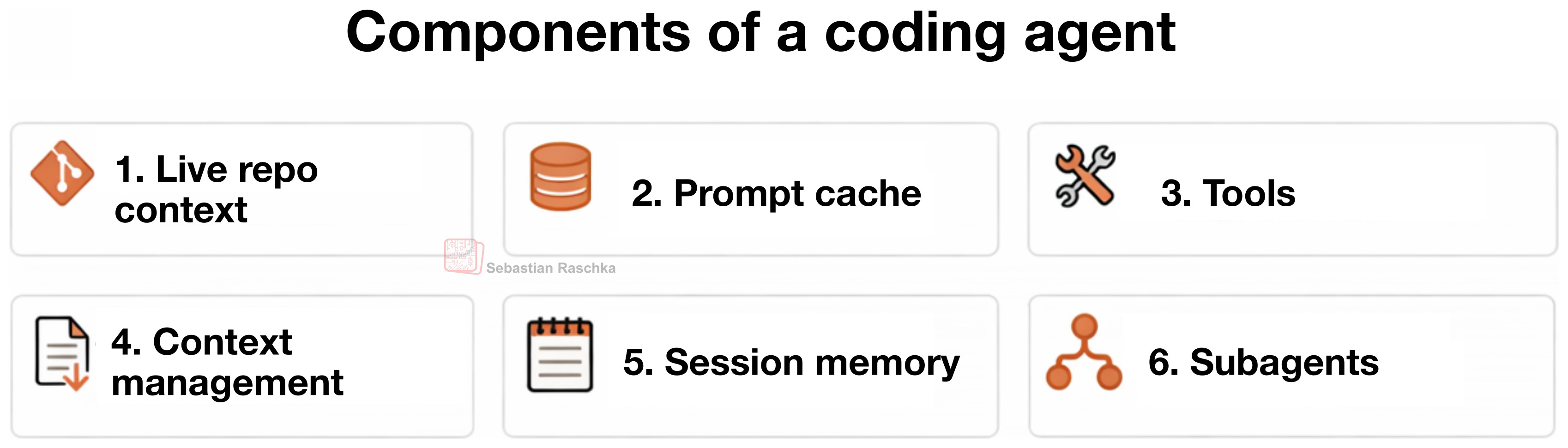
By the way, in this article, I use the terms “coding agent” and “coding harness” somewhat interchangeably for simplicity. (Strictly speaking, the agent is the model-driven decision-making loop, while the harness is the surrounding software scaffold that provides context, tools, and execution support.)
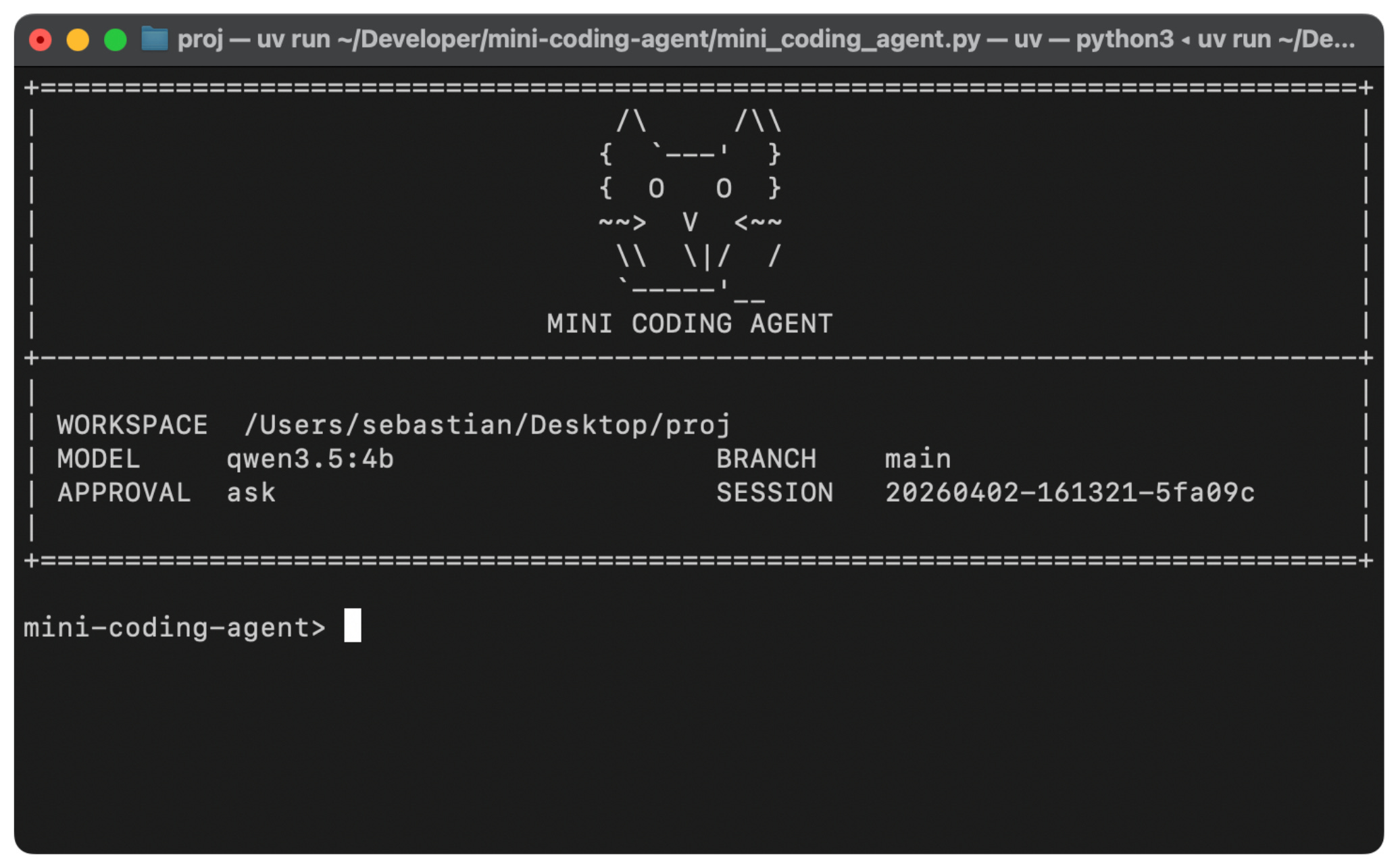
Anyways, below are six main components of coding agents. You can check out the source code of my minimal but fully working, from-scratch Mini Coding Agent (implemented in pure Python), for more concrete code examples. The code annotates the six components discussed below via code comments:
##############################
#### Six Agent Components ####
##############################
# 1) Live Repo Context -> WorkspaceContext
# 2) Prompt Shape And Cache Reuse -> build_prefix, memory_text, prompt
# 3) Structured Tools, Validation, And Permissions -> build_tools, run_tool, validate_tool, approve, parse, path, tool_*
# 4) Context Reduction And Output Management -> clip, history_text
# 5) Transcripts, Memory, And Resumption -> SessionStore, record, note_tool, ask, reset
# 6) Delegation And Bounded Subagents -> tool_delegate
1. Live Repo Context
This is maybe the most obvious component, but it is also one of the most important ones.
When a user says “fix the tests” or “implement xyz,” the model should know whether it is inside a Git repo, what branch it is on, which project documents might contain instructions, and so on.
That’s because those details often change or affect what the correct action is. For example, “Fix the tests” is not a self-contained instruction. If the agent sees AGENTS.md or a project README, it may learn which test command to run, etc. If it knows the repo root and layout, it can look in the right places instead of guessing.
Also, the git branch, status, and commits can help provide more context about what changes are currently in progress and where to focus.
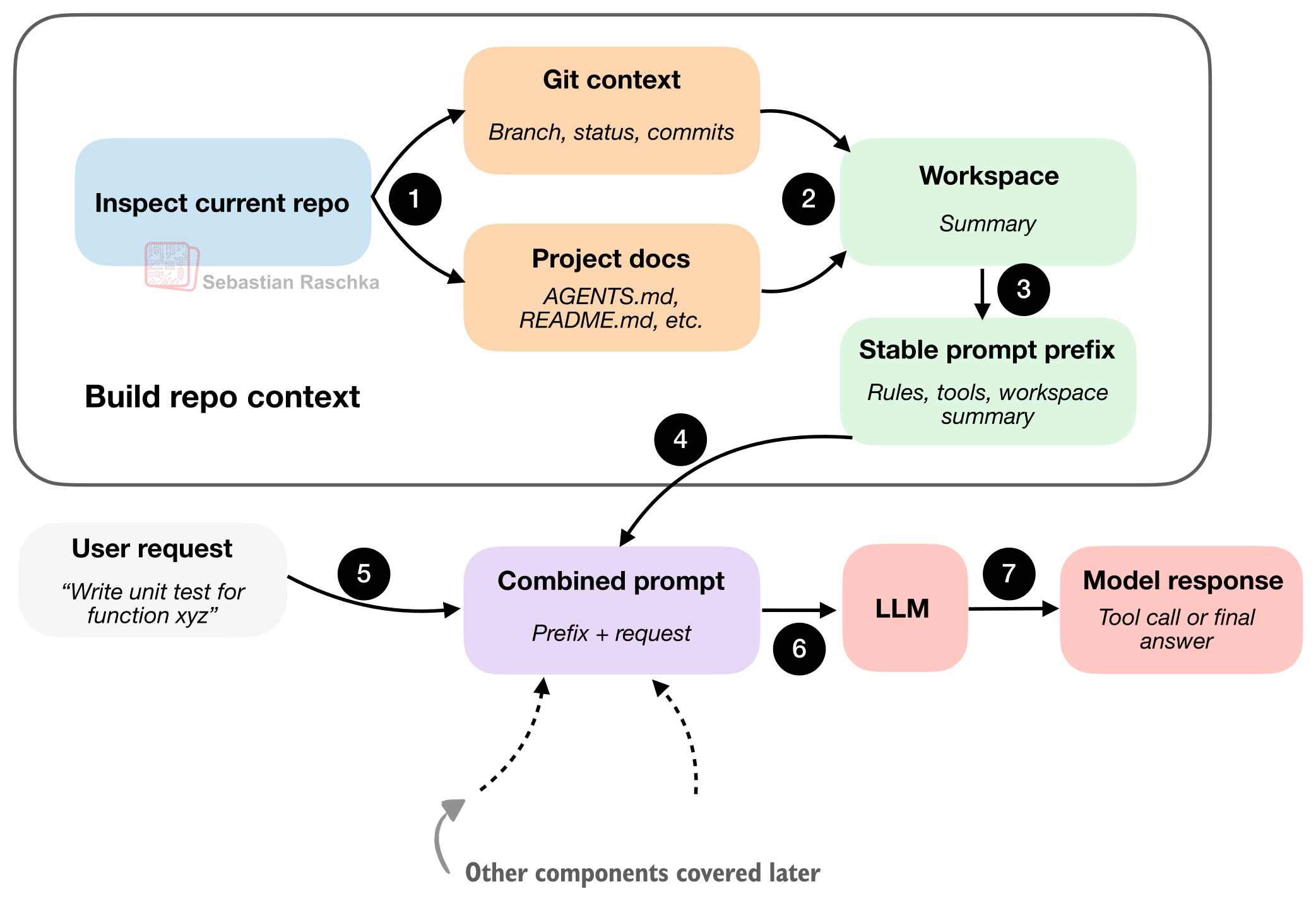
The takeaway is that the coding agent collects info (”stable facts” as a workspace summary) upfront before doing any work, so that it’s is not starting from zero, without context, on every prompt.
2. Prompt Shape And Cache Reuse
Once the agent has a repo view, the next question is how to feed that information to the model. The previous figure showed a simplified view of this (“Combined prompt: prefix + request”), but in practice, it would be relatively wasteful to combine and re-process the workspace summary on every user query.
I.e., coding sessions are repetitive, and the agent rules usually stay the same. The tool descriptions usually stay the same, too. And even the workspace summary usually stays (mostly) the same. The main changes are usually the latest user request, the recent transcript, and maybe the short-term memory.
“Smart” runtimes don’t rebuild everything as one giant undifferentiated prompt on every turn, as illustrated in the figure below.
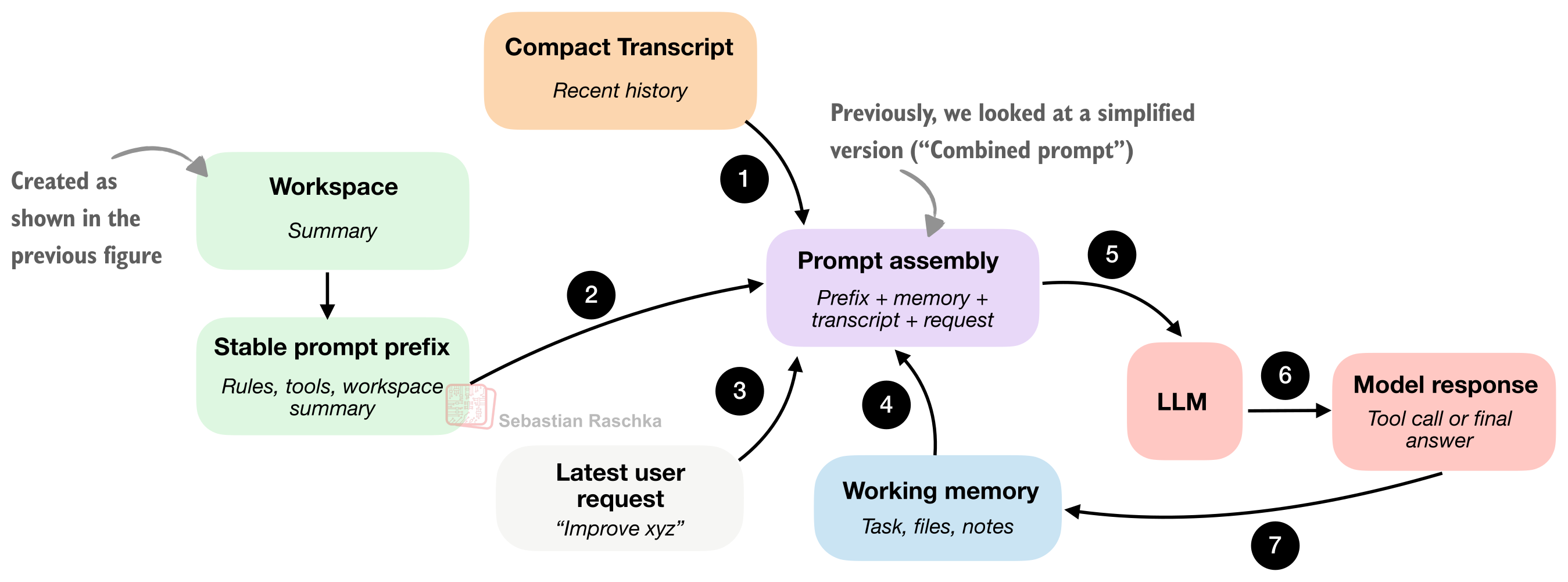
The main difference from section 1 is that section 1 was about gathering repo facts. Here, we are now interested in packaging and caching those facts efficiently for repeated model calls.
The “stable” “Stable prompt prefix” means that the information contained there doesn’t change too much. It usually contains the general instructions, tool descriptions, and the workspace summary. We don’t want to waste compute on rebuilding it from scratch in each interaction if nothing important has changed.
The other components are updated more frequently (usually each turn). This includes short-term memory, the recent transcript, and the newest user request.
In short, the caching aspect for the “Stable prompt prefix” is simply that a smart runtime tries to reuse that part.
3. Tool Access and Use
Tool access and tool use are where it starts to feel less like chat and more like an agent.
A plain model can suggest commands in prose, but an LLM in a coding harness should do something narrower and more useful and be actually able to execute the command and retrieve the results (versus us calling the command manually and pasting the results back into the chat).
But instead of letting the model improvise arbitrary syntax, the harness usually provides a pre-defined list of allowed and named tools with clear inputs and clear boundaries. (But of course, something like Python subprocess.call can be part of this so that the agent could also execute an arbitrary wide list of shell commands.)
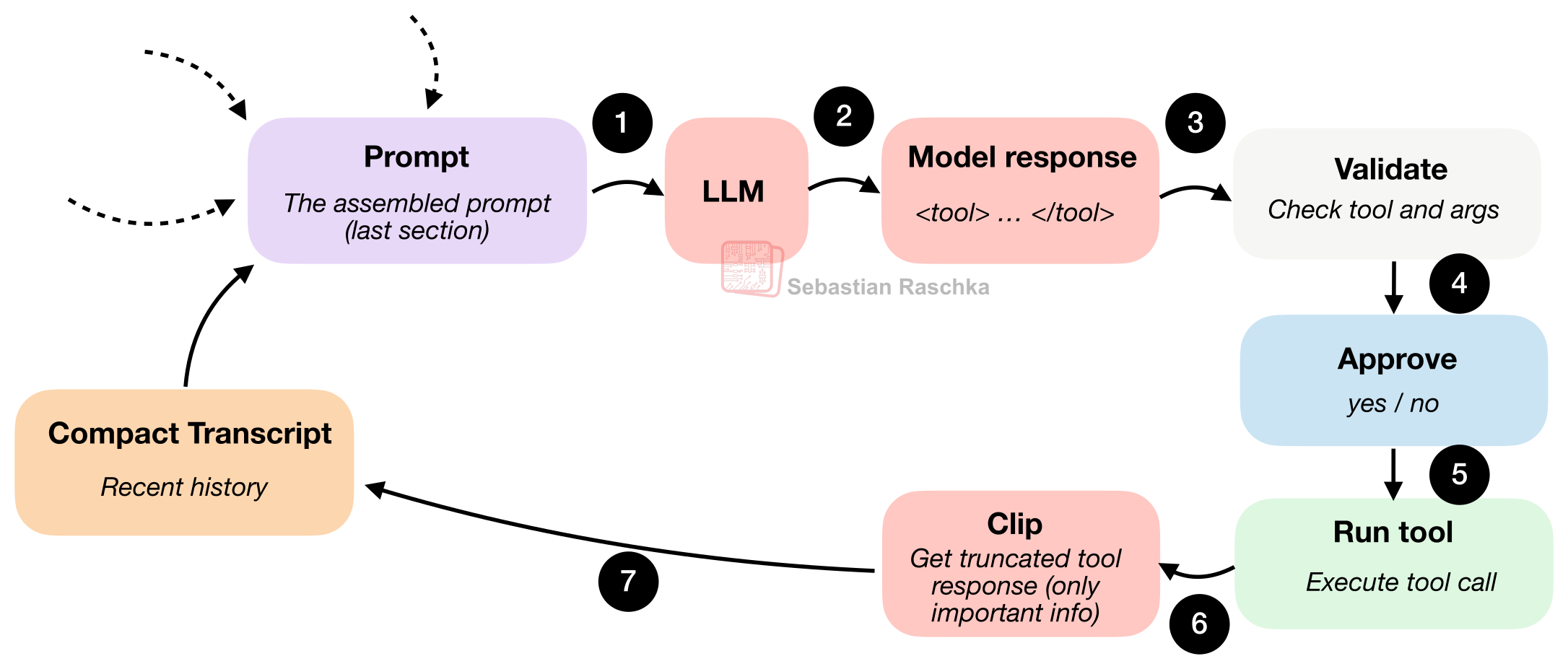
The tool-use flow is illustrated in the figure below.
To illustrate this, below is an example of how this usually looks to the user using my Mini Coding Agent. (This is not as pretty as Claude Code or Codex because it is very minimal and uses plain Python without any external dependencies.)
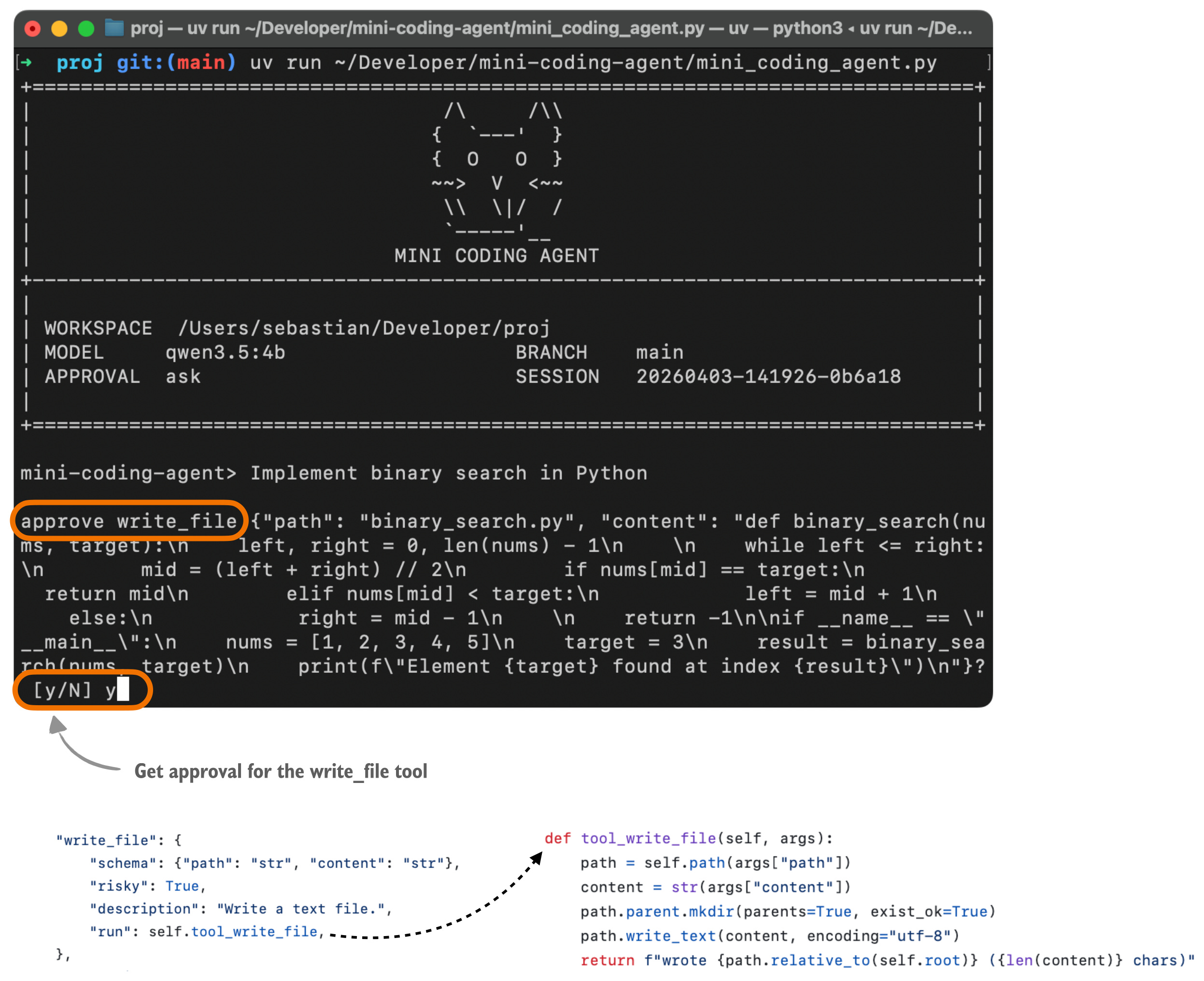
Here, the model has to choose an action that the harness recognizes, like list files, read a file, search, run a shell command, write a file, etc. It also has to provide arguments in a shape that the harness can check.
So when the model asks to do something, the runtime can stop and run programmatic checks like
“Is this a known tool?”,
“Are the arguments valid?”,
“Does this need user approval?”
“Is the requested path even inside the workspace?”
Only after those checks pass does anything actually run.
While running coding agents, of course, carries some risk, the harness checks also improve reliability because the model doesn’t execute totally arbitrary commands.
Also, besides rejecting malformed actions and approval gating, file access can be kept inside the repo by checking file paths.
In a sense, the harness is giving the model less freedom, but it also improves the usability at the same time.
4. Minimizing Context Bloat
Context bloat is not a unique problem of coding agents but an issue for LLMs in general. Sure, LLMs are supporting longer and longer contexts these days (and I recently wrote about the attention variants that make it computationally more feasible), but long contexts are still expensive and can also introduce additional noise (if there is a lot of irrelevant info).
Coding agents are even more susceptible to context bloat than regular LLMs during multi-turn chats, because of repeated file reads, lengthy tool outputs, logs, etc.
If the runtime keeps all of that at full fidelity, it will run out of available context tokens pretty quickly. So, a good coding harness is usually pretty sophisticated about handling context bloat beyond just cutting or summarizing information like regular chat UIs.
Conceptually, the context compaction in coding agents might work as summarized in the figure below. Specifically, we are zooming a bit further into the clip (step 6) part of Figure 8 in the previous section.
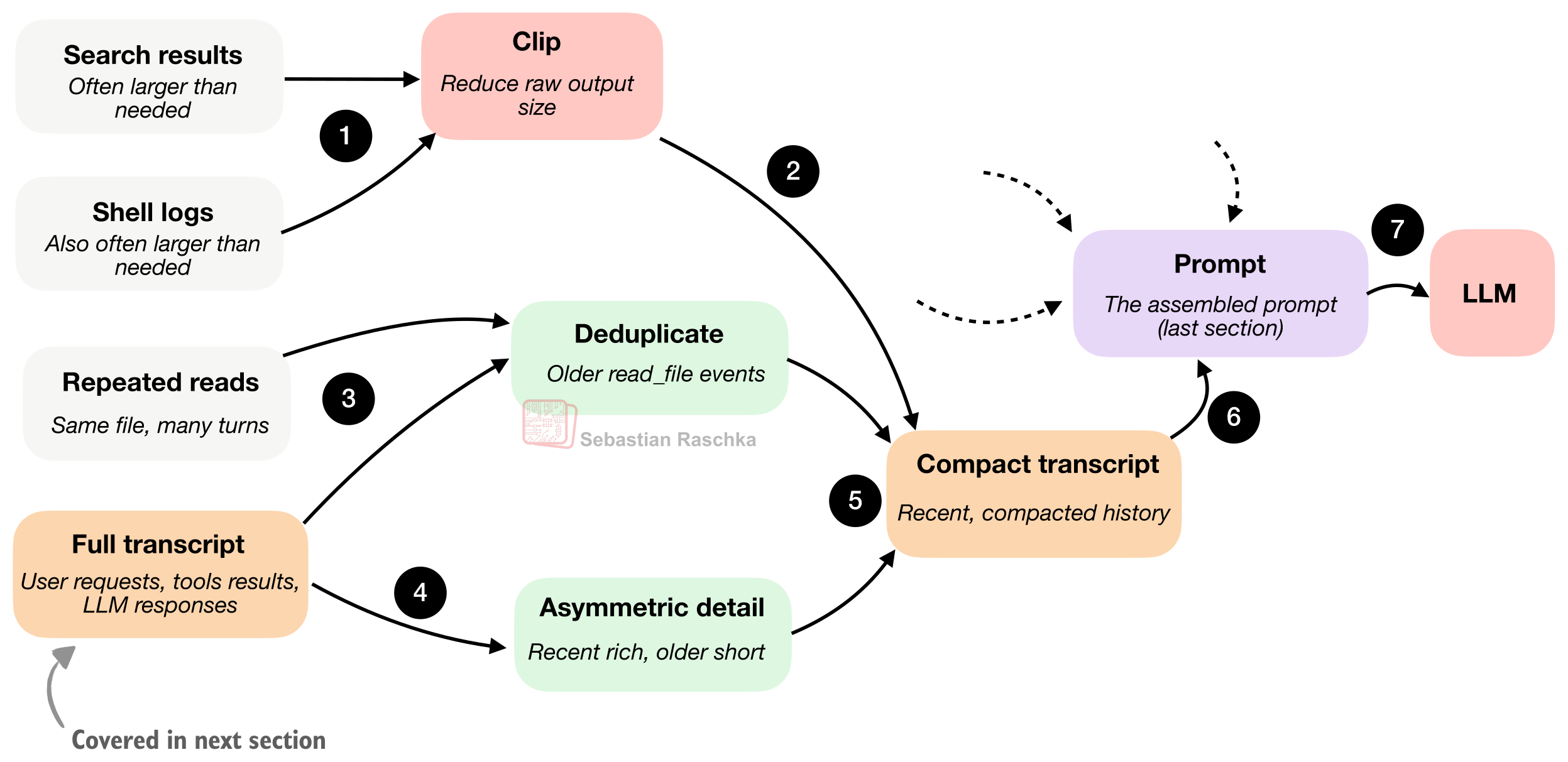
A minimal harness uses at least two compaction strategies to manage that problem.
The first is clipping, which shortens long document snippets, large tool outputs, memory notes, and transcript entries. In other words, it prevents any one piece of text from taking over the prompt budget just because it happened to be verbose.
The second strategy is transcript reduction or summarization, which turns the full session history (more on that in the next section) into a smaller promptable summary.
A key trick here is to keep recent events richer because they are more likely to matter for the current step. And we compress older events more aggressively because they are likely less relevant.
Additionally, we also deduplicate older file reads so the model does not keep seeing the same file content over and over again just because it was read multiple times earlier in the session.
Overall, I think this is one of the underrated, boring parts of good coding-agent design. A lot of apparent “model quality” is really context quality.
5. Structured Session Memory
In practice, all these 6 core concepts covered here are highly intertwined, and the different sections and figures cover them with different focuses or zoom levels. In the previous section, we covered prompt-time use of history and how we build a compact transcript. The question there is: how much of the past should go back into the model on the next turn? So the emphasis is compression, clipping, deduplication, and recency.
Now, this section, structured session memory, is about the storage-time structure of history. The question here is: what does the agent keep over time as a permanent record? So the emphasis is that the runtime keeps a fuller transcript as a durable state, alongside a lighter memory layer that is smaller and gets modified and compacted rather than just appended to.
To summarize, a coding agent separates state into (at least) two layers:
working memory: the small, distilled state the agent keeps explicitly
a full transcript: this covers all the user requests, tool outputs, and LLM responses
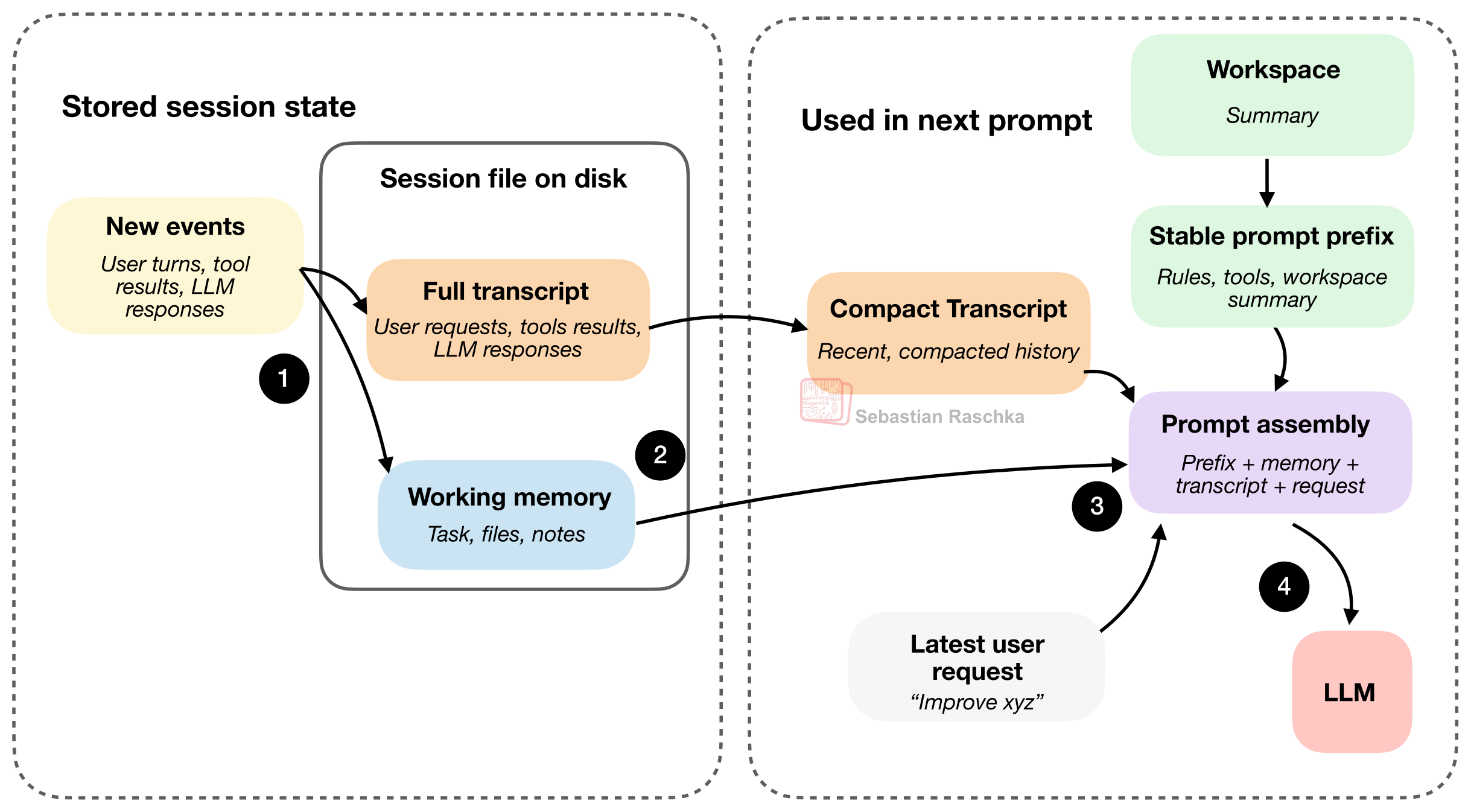
The figure above illustrates the two main session files, the full transcript and the working memory, that usually get stored as JSON files on disk. As mentioned before, the full transcript stores the whole history, and it’s resumable if we close the agent. The working memory is more of a distilled version with the currently most important info, which is somewhat related to the compact transcript.
But the compact transcript and working memory have slightly different jobs. The compact transcript is for prompt reconstruction. Its job is to give the model a compressed view of recent history so it can continue the conversation without seeing the full transcript every turn. The working memory is more meant for task continuity. Its job is to keep a small, explicitly maintained summary of what matters across turns, things like the current task, important files, and recent notes.
Following step 4 in the figure above, the latest user request, together with the LLM response and tool output, would then be recorded as a “new event” in both the full transcript and working memory, in the next round, which is not shown to reduce clutter in the figure above.
6. Delegation With (Bounded) Subagents
Once an agent has tools and state, one of the next useful capabilities is delegation.
The reason is that it allows us to parallelize certain work into subtasks via subagents and speed up the main task. For example, the main agent may be in the middle of one task and still need a side answer, for example, which file defines a symbol, what a config says, or why a test is failing. It is useful to split that off into a bounded subtask instead of forcing one loop to carry every thread of work at once.
(In my mini coding agent, the implementation is simpler, and the child still runs synchronously, but the underlying idea is the same.)
A subagent is only useful if it inherits enough context to do real work. But if we don’t restrict it, we now have multiple agents duplicating work, touching the same files, or spawning more subagents, and so on.
So the tricky design problem is not just how to spawn a subagent but also how to bind one :).
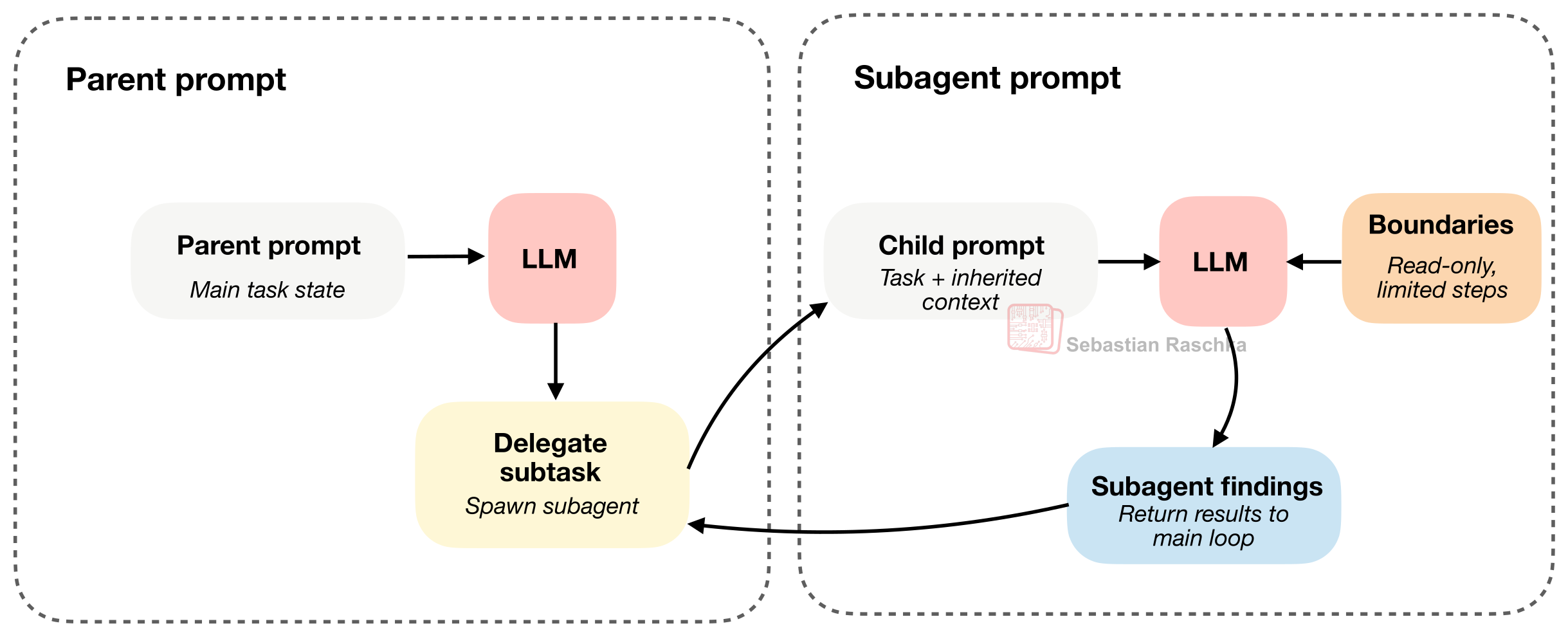
The trick here is that the subagent inherits enough context to be useful, but also has it constrained (for example, read-only and restricted in recursion depth)
Claude Code has supported subagents for a long time, and Codex added them more recently. Codex does not generally force subagents into read-only mode. Instead, they usually inherit much of the main agent’s sandbox and approval setup. So, the boundary is more about task scoping, context, and depth.
Components Summary
The section above tried to cover the main components of coding agents. As mentioned before, they are more or less deeply intertwined in their implementation. However, I hope that covering them one by one helps with the overall mental model of how coding harnesses work, and why they can make the LLM more useful compared to simple multi-turn chats.
If you are interested in seeing these implemented in clean, minimalist Python code, you may like my Mini Coding Agent.
How Does This Compare To OpenClaw?
OpenClaw may be an interesting comparison, but it is not quite the same kind of system.
OpenClaw is more like a local, general agent platform that can also code, rather than being a specialized (terminal) coding assistant.
There are still several overlaps with a coding harness:
it uses prompt and instruction files in the workspace, such as AGENTS.md, SOUL.md, and TOOLS.md
it keeps JSONL session files and includes transcript compaction and session management
it can spawn helper sessions and subagents
etc.
However, as mentioned above, the emphasis is different. Coding agents are optimized for a person working in a repository and asking a coding assistant to inspect files, edit code, and run local tools efficiently. OpenClaw is more optimized for running many long-lived local agents across chats, channels, and workspaces, with coding as one important workload among several others.
I am excited to share that I finished writing Build A Reasoning Model (From Scratch) and all chapters are in early access yet. The publisher is currently working on the layouts, and it should be available this summer.
This is probably my most ambitious book so far. I spent about 1.5 years writing it, and a large number of experiments went into it. It is also probably the book I worked hardest on in terms of time, effort, and polish, and I hope you’ll enjoy it.
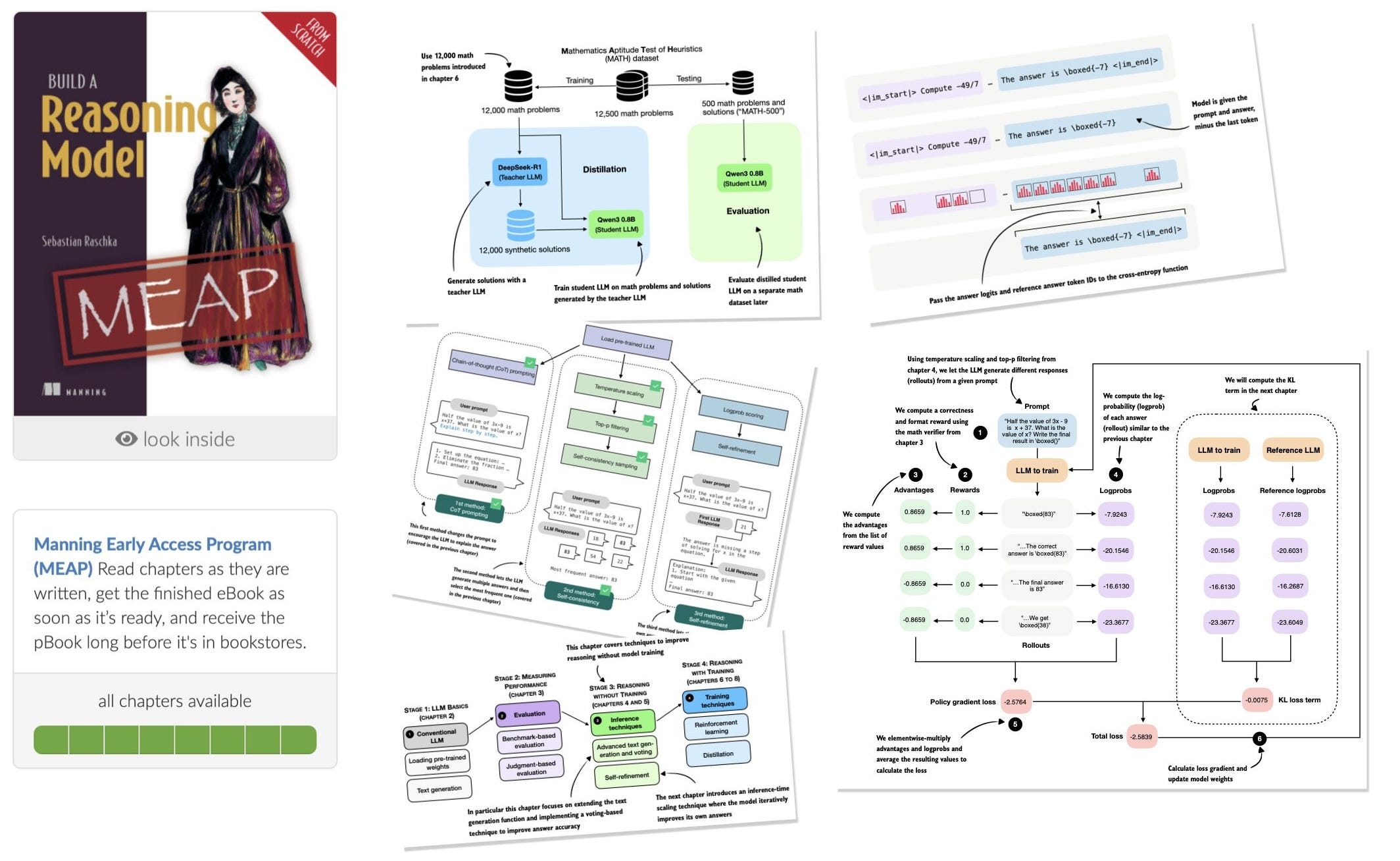
The main topics are
evaluating reasoning models
inference-time scaling
self-refinement
reinforcement learning
distillation
There is a lot of discussion around “reasoning” in LLMs, and I think the best way to understand what it really means in the context of LLMs is to implement one from scratch!
Amazon (pre-order)
Manning (complete book in early access, pre-final layout, 528 pages)
Did you read the Claude Code Source for this? The timing is quite aligned. Hehehe
There’s a strong parallel here with trading systems people try to build. Everyone obsesses over the model—the signal, the indicator, the “edge.” But in practice, it’s the harness around it that determines whether it actually works.
A good trader already knows this intuitively. The idea isn’t enough. You need structure—rules for execution, memory of past mistakes, constraints on behavior, a way to filter noise and focus only on what matters. Without that, even a strong signal gets diluted by context, hesitation, or overreaction.
What you’re describing here is basically the same thing formalized. The model is the intuition. The harness is the discipline. And most of the real performance comes from how those two interact over time.
That’s why two people can look at the same market, the same level, the same setup—and one extracts consistency while the other churns. The difference isn’t what they see. It’s the system they’ve built around what they see.